 Credit

Introduction
The digital creativity has made the visual enhancement smarter and more real than ever before. With the flexibility to track their fitness gains, model for modelling portfolios, or Instagram image style, now people are using AI body before and after changer applications and visualizing the transformation with exquisite realism.
These new platforms employ artificial intelligence to dissect, remodel, and augment the human body in a natural way without ruining realism. And all it takes is a single upload, and curves, muscles, and posture can be perfected with each smart algorithm.
We will get to know more about the functionality of AI body editors, their key characteristics, and why they are the most popular photo editing tool these days.
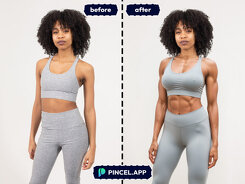
How Does an AI Body Editor Work?
An AI body editor has a user-friendly editing process. There is no need to have advanced photo editing skills; AI takes care of everything on its own.
Here’s how it usually works:
Upload Your Image
First of all, upload a clear image on the AI body enhancer application. The majority of tools are used to support JPEG and PNG.
AI Detects the Body
The system recognizes some of the body parts, like arms, waist, legs and torso, using advanced recognition algorithms.
Apply Edits or Enhancements
You have a choice of such options as shape adjustment, slimming, height alteration, muscle definition or general tone improvement. These edits are then made with a seamless application by the AI body before and after changer.
Compare Before and After
See how you will look different in a before-and-after side-by-side format. It is possible to do additional edits to achieve a natural and balanced finish.
Download the Final Image
After the satisfied view, download your sharpened image in high resolution to use or display in the portfolio.
The intelligent process makes your body appear better but natural, with no distortion and no over-editing.
Top Features of AI Body before and After Tools
Such tools as the modern AI body editor and AI body enhancer programs have many features that simplify the editing and make it professional:
Automatic Body Detection: AI can automatically detect and adjust particular parts of the body.
Before and After Comparison: See real-time transformations compared.
Slimming & Shaping Tools: Add or remove proportions to make it look natural and balanced.
AI Muscle Definition: Tone and definition increase, but the skin texture is not changed.
Posture Correction: Enhance your posture to stand confidently.
Skin Smoothing & Lighting Adjustment: Correct flaws and preserve natural colors.
High-Resolution Output: Export high-definition pictures in HD to print or social media.
These attributes place AI-powered tools as the best tools to use by influencers, photographers, and fitness experts who demand near-perfect visual descriptions.
Best AI Body Changer Tools in 2025
Below are the top online tools of AI Body before and after the changer:
Pixelfox AI Body Editor
It is one of the most developed and user-friendly tools. The Pixelfox AI Body Enhancer allows individuals to optimise their bodies, improve body proportions and see before-after changes in real time. It is perfectly smooth and realistic with its precision AI, making it ideal to capture a portrait, fitness, or even lifestyle photograph.
Perfect ME
One of the most famous applications on mobile which is capable of editing bodies and enhancing faces using AI. This tool is perfect in making instant photo modifications when you are on the move.
Body Editor by Retouch Me
An AI body enhancer of professional quality, with the ability to make detailed custom edits, and with proportions looking natural.
YouCam Perfect
A mobile application that offers features of body enhancement, skin retouching, and light adjustments with the help of AI.
Facetune AI Editor
This is perfect among influencers and models who require body editing and touch-up features on an AI-based level, yet at a professional level.
Final Thoughts
The concept of artificial intelligence has transformed the manner in which we view and manipulate images altogether. Anyone can easily make transformations of professional quality using AI body before and after changer tools, and they are precise and realistic.
From reshaping to refining, Pixelfox AI body editors enable you to upgrade your natural features with refinements and finesse. No matter the reason you want to build before-and-after fitness images, enhance percentages, or would like to get creative with your editing, these tools can make it happen with only a few clicks.
Smart, quicker and AI-driven photo editing is the future of photo editing, and it is already with us.
FAQs:
What is an AI body before and after the change?
It is an AI-based application that can automatically modify and refine body shapes in images and lets users see realistic before-and-after changes.
How does an AI body editor work?
A body micro-editor using AI processes your photo, images your body, and uses smart reshaping or toning filters that do not corrupt natural information.
Are AI body editing tools safe to use?
Yes, reliable websites will guarantee the privacy of users and will not archive or redistribute your posted images.