 Credit

Video content travels quickly around the globe. Every day, people watch videos in a variety of languages. Viewers still desire a genuine relationship, though. They prefer natural speaking, matching lip movements, and clear voices. For this reason, an AI video translator with lip sync has grown in importance as a tool for corporations, marketers, educators, and creators.
A robust solution for precise translation, seamless lip sync, and genuine lip reading support is provided by Pixelfox.ai. Your video will sound natural in all languages thanks to the platform, which maintains timing and expression. This enables users to communicate with audiences around the world in a simple and organic way.
This article describes how lip sync is important, how AI video translation functions, and how Pixelfox.ai maintains accuracy and sharpness.
What Is an AI Video Translator With Lip Sync?
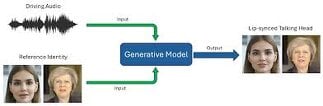
An AI video translator with lip sync changes the spoken language in a video while matching the mouth movement to the new audio. It rebuilds the lip pattern so the viewer sees a clean match.
How AI Video Translation Works
While matching the mouth movement to the new audio, an AI video translator with lip sync modifies the spoken language in a video. In order for the spectator to see a perfect match, it reconstructs the lip pattern.
How the system works
Reads the original audio
Creates a translated version with new timing
Matches the new speech to lip shape
Adjusts frames for smooth motion
Blends lighting and skin texture
The final clip looks like the person spoke the new language in real time.
Why Lip Sync Matters in Video Translation
The viewer can observe the discrepancy between sound and mouth movement in the absence of lip sync. This undermines trust and makes the video feel strange. With lip sync, the viewer can focus on the message and not the error.
Benefits of proper lip sync
Better viewer experience
Natural emotional expression
Smooth social media performance
Higher trust in the content
How Pixelfox.ai Improves Lip Sync Translation
Pixelfox.ai combines voice-timing and face-motion tracking models. Speech speed, cheek position, jaw movement, and mouth shape are all read by these systems. They then create a new lip motion based on the translated audio.
Key strengths
Accurate phoneme matching
Smooth frame-to-frame edits
Natural lighting across the lips
No strange stretching or distortion
Works for many languages
This gives a video that feels clean and true to the speaker.
What Is a Lip Reading Translator?
An artificial intelligence technology that reads lips movements to comprehend speech is called a lip reading translator. Because it understands what the lips are attempting to say rather than just what the audio says, it increases accuracy when used in conjunction with translation.
Lip reading signals are used by Pixelfox.ai to enhance shape matching and timing.
Why People Use AI Video Translation Tools
People want their videos to reach more viewers. They want clear messaging in different languages without re-shooting content.
Common use cases
YouTube creators
Business training videos
E-learning content
Marketing and ads
Short-form social videos
Interviews
Podcasts with face-cam
AI video translation makes all of this easier and faster.
How to Use Pixelfox.ai for Video Translation With Lip Sync
Step 1: Upload your video
Use any standard video format.
Step 2: Pick your target language
Choose the language you want the video translated into.
Step 3: Enable lip sync
Turn on the ai video translator with lip sync feature.
Step 4: Process the video
Pixelfox.ai will translate, sync lips, and adjust motion.
Step 5: Download your final clip
Save the translated video in high quality.
Why Pixelfox.ai Creates More Natural Lip Movement
Some tools create stiff or robotic lip motion. Pixelfox.ai avoids this with softer animation curves and emotion-aware mapping.
Realism features
Natural jaw rotation
Smooth cheek movement
Realistic smile lines
Soft lighting blend
No pixel jitter near the mouth
The result feels human and comfortable to watch.
How AI Helps Make Translated Voices Sound More Natural
More than just words are needed for an effective translation. Pitch, tempo, and tone are also important. Pixelfox.ai modifies the voice to reflect the style of the original speaker. This keeps the cause of the feeling close at hand.
Voice improvements
Balanced tone
Smooth pacing
Expressive delivery
Clear pronunciation
No robotic sound
This helps the message stay true.
Is AI Video Translation With Lip Sync Worth It?
Yes. The tool saves time and gives clean global communication. It lets one video work in many countries without reshooting or dubbing.
How Lip Reading Helps Improve Accuracy
Lip reading helps the system detect unclear audio or accents. It reads shapes and matches them to real speech patterns. This lets Pixelfox.ai build better sync and cleaner timing.
What lip reading adds
More accurate timing
Better consonant matching
Cleaner mouth curve
Natural expression flow
This creates a smoother final video.
How Businesses Use AI Video Translators
Brands use video translation to speak to global markets fast. It is useful for training, onboarding, marketing, and support materials.
Benefits for companies
Fast localization
Lower production cost
Better reach in new markets
Consistent messaging
Pixelfox.ai makes this simple for teams.
How Teachers and Trainers Use AI Video Translation
Many courses need multilingual support. Teachers use translated videos to help students learn in their native language.
Advantages
Easy learning
Clear pronunciation
Better engagement
Faster content creation
With lip sync, the learning feels more natural.
Why Pixelfox.ai Is a Trusted Platform
Pixelfox.ai works with careful engineering and real-world testing. The system keeps identity, emotion, and timing stable. It avoids strange edits and keeps lips aligned with the new audio.
Trust points
Realistic lip sync
Clear audio translation
Smooth motion correction
Safe and natural facial edits
High-quality video export
Users rely on it for both casual and professional projects.
Tips for Getting the Best Results With AI Video Translation
1. Use clear audio
Better sound gives more accurate timing.
2. Keep the face well lit
Good lighting helps lip reading and motion tracking.
3. Speak at a steady pace
The tool works best with stable speech.
4. Upload high-quality video
More pixels give cleaner lip animation.
Limitations of AI Video Translation
The tool is strong, but it has limits.
What it cannot fix
Very blurry face footage
Blocked mouths
Extreme fast speech
Heavy face shadows
FAQ 1. What is the easiest way to translate a video with lip sync?
Upload your clip to Pixelfox.ai and turn on the lip sync translator.
2. Does the lip movement look real?
Yes. The system studies face motion and makes smooth, natural edits.
3. Can the tool handle many languages?
Yes. Pixelfox.ai supports a wide range of languages for translation.
4. Does the voice sound natural after translation?
Yes. The system adjusts tone and pacing for a natural result.
5. Can AI read lips to improve accuracy?
Yes. Lip reading signals help match timing and improve translation quality.
6. Does it work for short videos?
Yes. It works for short clips and long videos.
7. Can creators use this for social media?
Yes. It works well for YouTube, TikTok, Instagram, and other platforms.
8. Is it fast?
Yes. Most videos process in a short time depending on length.