 Credit

In the modern world of photos, clean and aesthetic images are really important. Background remover apps have become an essential part of whether you are editing product photos, creating social media content or designing your own personal projects. It is now easy to remove, replace or edit backgrounds using advanced AI and you do not need Photoshop skills to do this.
We are going to discuss the most effective free background remover apps in this article that enable one to change the background with a single tap of the finger. These AI-driven editors can guarantee that anybody, including amateurs, can achieve professional-quality results without spending a single cent on web-based tools or mobile apps.
What Is a Background Remover App?
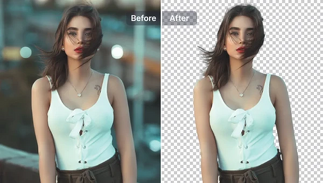
The Background remover app is an artificial intelligence photo editor that identifies and removes undesired backgrounds in pictures. It excludes all the surrounding items and makes the edges sharp and natural and eliminates or substitutes the background with transparency or custom images.
These smart tools are based on machine learning and object recognition, unlike manual cutout tools, and are faster, cleaner, and more accurate.
Key Features to Look for in a Background Remover App
To select the appropriate app, you will need to seek the following key features:
AI automatic detection: Fast background removal with accuracy.
High-resolution output: Provides sharp edges with no pixelation.
Transparent background export: Perfect to be used on social media or eCommerce.
Batch background removal: Background removal can be performed in batches.
Free download or online use: There is a group of tools which do not even need an account.
Best Free Background Remover Apps
Below are the best background remover apps that are free and can be used to achieve studio-level edits:
Remove.bg
Perhaps the most downloaded background eraser tool online, Remove.bg is an automatic and precise background removal tool. You post your photo and within moments the AI is able to isolate your subject to perfection, product listings, ID photos, and online materials. The best part? It provides free downloads of smaller resolutions and cheap credits on HD exports.
Canva Background Remover
This in-built background remover tool is a treasure trove in case you already design in Canva. It allows you to delete, change or blur backgrounds in real time right in your design workspace. You can use some limited free features as a part of Canva Pro but still mix them with templates, and this is why it is one of the most suitable applications to remove backgrounds to use on social media.
PhotoRoom
PhotoRoom is offered to creators and sellers of eCommerce who require quick, smooth images. It employs AI to blur backgrounds, change them to color or custom templates, and even add shadows to be realistic. It has a free version of the background remover, which grants you quick edits or the HD exports.
Pixlr
Pixlr is a brand that is still a favourite among web editors. It has a free AI eraser utility that gives precise cutouts, with the option of adjusting edges with a manual tool to increase their accuracy. Pixlr can also be used to add effects and overlays immediately after removing the background, which is ideal when you favor working with browsers.
Pixelcut
Pixelcut is a relatively recent and yet amazing photo background remover app on Android and iOS. It has automatic erasing, real-time previews, and templates, which makes the tool ideal for influencers and digital creators who are seeking a nice aesthetic in seconds.
How to Choose the Right One
The selection of the appropriate background remover is based on the purpose and workflow:
· To quickly edit on the Web, use Remove.bg or Pixlr.
· Canva beats the competition in creative posts and designs.
· PhotoRoom professional templates are offered for product or brand photography.
· Pixelcut gives you real-time results when you are a mobile user.
Consider your ambitions, are you going to need clear shots of listings or tailor-made backgrounds on social media? After doing that, it becomes simple to select the best tool.
FAQs
Which app is best for removing backgrounds for free?
The best free background remover apps to use are seen to be remove.bg and Pixlr because they are fast and effective with their results.
Can I remove backgrounds without downloading software?
Yes! Background remover programs such as Remove.bg and Pixlr enable you to delete backgrounds instantly through any web browser.
Do background remover apps work on selfies or portraits?
Absolutely,human profiles are perfectly identified by AI powered apps and are therefore ideal in profile pictures, headshots and portraits.
Final Thoughts
Gone are the days of trying to work with sophisticated photo editors. Newer generations of AI background remover apps allow everyone to make clean, professional, and engaging images within a few seconds.
As a seller, designer, or content creator online, it can give you the power to be a professional photo editor without subscriptions, expertise, and effort with these best free background remover apps.
“Test it out now and give all of your photos the perfect, distortion-free background!”