 Credit

Whether you want to have fun, create content for social media, or edit photos for work, the Face Magic app is revolutionizing photo and video editing. With the help of FaceMagic AI, you can swap faces, create realistic animations, and make your images look professional—all from your phone. In this post, we'll explain how Face Magic works, what makes it unique, and why it's become a favorite among creators who enjoy clever AI tools.
What Is Face Magic?
Face Magic is an AI-powered photo and video editing app that enables instant face swapping, video creation, and photo transformation. It analyzes facial features using deep learning and applies them organically to any template for a picture or video.
To put it simply, the AI blends everything together seamlessly after you upload your photo and select a template or another face.
To put it briefly, Face Magic uses no technical editing skills to create realistic face swaps in a matter of seconds.
How the Face Magic App Works
The app maps lighting, angles, and facial expressions using sophisticated AI algorithms. Then, using precise motion and emotion, it recreates your face in a fresh picture or video template.
Here's how to apply it:
Add a Picture: Select a clear photo of your face.
Select a Template: Choose from images, memes, music videos, or movie scenes.
Use FaceMagic AI: Your face is automatically processed by the app.
Save or Share: Immediately download or publish your edited material.
It takes less than a minute to complete. All you need is creativity; editing experience is not necessary.
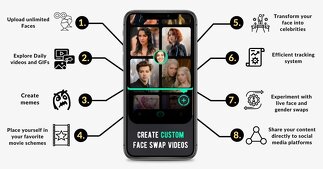
Why FaceMagic AI Stands Out
There are hundreds of editing apps out there, but FaceMagic AI stands apart because of its accuracy and realism. Instead of a copy-paste effect, it produces natural-looking results that match the lighting and movement of the original media.
Key Features of the Face Magic App
Realistic Face Swaps: AI detects skin tone, lighting, and facial angles.
AI-Powered Video Generation: Turn still images into short, animated clips.
Multiple Face Swaps: Edit group photos or videos with multiple people.
Templates and Scenes: Choose from trending video templates for fast results.
Cross-Platform Sharing: Share directly to TikTok, Instagram, or YouTube.
Quality and Performance
FaceMagic AI is optimized for mobile performance. Even large video files process smoothly, and the output quality remains sharp and consistent. The app also minimizes artifacts and blending errors that are common in other tools.
The Technology Behind FaceMagic AI
Deepfake technology and GANs (Generative Adversarial Networks) are the driving forces behind the FaceMagic AI system. To identify and replicate facial features, skin tones, and facial expressions, these models are trained on enormous datasets.
This AI understands context, in contrast to conventional photo filters. For results that look natural, it modifies emotion, lighting, and even tiny facial expressions.
FaceMagic is among the most dependable tools for imaginative and lifelike edits because of its high degree of accuracy.
Is the Face Magic App Safe to Use?
Yes, as long as you follow its privacy guidelines, Face Magic is safe to use. After your session, the app doesn't keep your personal information or use faces you've uploaded. However, it's a good idea to use pictures that you feel comfortable posting online.
To avoid fake versions, only ever download the official Face Magic app from reliable sources like the App Store or Google Play.
Who Should Use Face Magic?
For anyone who enjoys producing digital content, FaceMagic is fantastic. Here are some ways that various users can gain:
Content producers: In just a few minutes, create humorous and viral videos.
Influencers on social media: Give standard posts a unique spin.
Companies: Use AI-generated images for product videos or advertisements.
Casual Users: Enjoy switching faces with friends or with scenes from movies.
The app makes AI photo editing simple and enjoyable, regardless of your level of experience.
How to Get the Most Out of Face Magic
Here are some quick tips to improve your AI editing if you're new to it:
Make Use of Great Photographs: Better swaps result from images that are clear and well-lit.
Try templates with comparable face angles to match lighting and angles.
Avoid Overuse: The outcome may appear unnatural if there are too many edits.
Experiment with Videos: For original ideas, try using movie or meme templates.
Save Originals: For future adjustments, always save your unedited files.
How to Download and Use Face Magic
You can download Face Magic app on:
Google Play Store (for Android)
Apple App Store (for iOS)
After installation, create an account or sign in with Google or Apple ID. You can start using free templates immediately or upgrade for premium effects.
Benefits of Using FaceMagic AI
Fast and Easy: Edits take under a minute.
Creative Freedom: Try new looks, characters, or expressions.
Professional Results: Great for both casual and commercial use.
AI Accuracy: Natural skin tone and texture matching.
Social Media Ready: Export videos in the best formats for sharing.
The Face Magic app blends entertainment with cutting-edge AI, making it a top choice for anyone who enjoys visual creativity.
Real-World Uses of Face Magic
Entertainment: Swap your face into movie scenes or memes.
Marketing: Use personalized faces in ad visuals or product demos.
Education: Teachers and creators use it for interactive storytelling.
Social Media: Create funny, viral content effortlessly.
FaceMagic has turned AI photo editing from a niche tool into a mainstream creative trend.
Common Issues and How to Fix Them
1. Blurry Output:
Try taking a picture with more resolution. Results are impacted by subpar input.
2. No Face Found:
Make sure your face is in the front and easily readable.
3. App Lagging:
Try clearing your cache or shutting down other apps. Processing video can require a lot of resources.
4. Watermark on Free Version:
To export without a watermark, upgrade to the Pro plan.
Why Users Love the Face Magic App
User reviews of FaceMagic frequently emphasize how simple it is to use and how realistic its edits are. Many users value the fact that it enables them to produce viral content without the need for pricey software.
Users of Instagram and TikTok who like experimenting with trends and filters are particularly fond of it.
Final Thoughts
The Face Magic app, which is powered by FaceMagic AI, is a potent combination of technology and creativity. This tool provides professional-quality results without requiring sophisticated editing skills, whether you're creating for your brand or for fun.
It is among the greatest AI photo and video tools on the market right now because it is quick, precise, and designed for the contemporary creator.
If you love transforming photos or want to bring your content ideas to life, give FaceMagic a try at PixelFox.ai.
FAQs
1. What is the purpose of Face Magic?
Face Magic is an AI-powered app that can be used to swap faces, create amusing videos, and add realistic edits to photos.
2. Does the Face Magic app have no cost?
Yes, you can download the basic templates for free. Premium features are unlocked with a Pro version.
3. Is FaceMagic AI secure?
Yes, the application deletes data after processing and makes use of secure servers. Download from the official app stores only.
4. Is it possible to use Face Magic for business projects?
Yes, but read the app's terms for commercial use before using it for advertisements, social media, or personal branding.
5. Is Face Magic compatible with Android and iPhone?
Yes, it works just as well on both platforms and is accessible on both.