 Credit

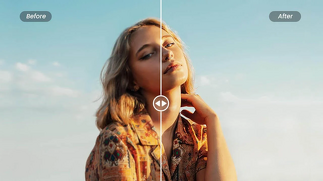
Have you ever captured a fantastic shot that becomes blurred or even bland when zoomed in? It is where an HD photo maker can come in! These clever, AI-based applications bring instant image quality or sharpness, or turn a usual photograph into a crystal-clear image.
An HD image maker is the best answer for you when you want a better image without the need to hire a professional to do the editing. It doesn’t matter which photo you have to fix, whether it is a selfie, landscape or even a product photo; you can now do it online and free of charge, improve the light, sharpen and add clarity.
We will discuss here the ways you can use these smart applications to repair and edit photographs in a couple of clicks.
What Is an HD Photo Maker?
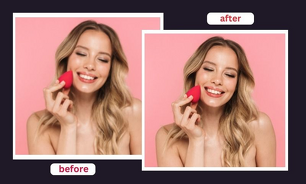
An HD photo maker is an advanced tool which allows you to improve the resolution and quality of your photos automatically. It examines your image with AI algorithms and adds realistic elements to it in order to give it a high-definition look.
Unlike the old editing programmes that just sharpen or brighten, AI image editors recreate your image pixel by pixel enhancing texture, tone and colour balance. Your low-quality picture can be made in a few seconds with the help of a high-end camera.
You can be restoring old photos, making the pictures look good on social media, or making the product photos look better, an HD image maker can provide high-quality output easily.
Why Use an HD Photo Maker?
Artificial intelligence-based HD photo creators are not just another editing tool but software that brings your images to life. Here’s why users love them:
Sharper Details: Add more edges and textures for a smooth, realistic finish.
Automatic Correction: AI alters brightness, contrast, and exposure immediately.
Color Enhancement: Makes natural hues come out without being forced.
One-Click Fix: It suits everyone, even the beginner with no editing skills.
Professional Output: Can be used in personal, creative, or business settings.
AI makes it fast and easy whether you need to print an image or make a better picture or even enhance marketing images.
How to Use an HD Photos Maker
This is how you can improve the quality of a photo with an image-fixing AI:
1. Choose a Reliable HD Photos Maker
Begin with an application that you can rely on, such as Pixelfox AI Enhancer, Fotor HD Image Creator, or Let’s Enhance. Such tools are focused on AI-based clarity correction.
2. Upload Your Image
All you have to do is to drop a photo into the tool. The majority of platforms accept such formats as JPG, PNG, and WebP.
3. AI Enhancement in Action
After uploading the image, AI photo enhancer evaluates each pixel in it, detecting blur, noise, and lighting errors, and automatically fixing them.
4. Preview the HD Version
Compare your new HD photo version to be sure that you have noticed improvements in texture, sharpness, and color.
5. Download in High Resolution
Store the improved image in a device. The picture will be brighter, sharper, and more professional.
You can use only these few steps and make any boring or rough image a high-definition masterpiece.
Benefits of Using an HD Image Creator
An HD image generator is a professional photo editor that is integrated into the browser. This is what makes it as effective as possible:
Instant Clarity: Ideal to enhance smartphone/low-light photos.
Fix Imperfections: Automatically removes blur, noise, and bad lighting.
Enhance Old Photos: Restore old photos without cleaning them up.
HD Conversion: Improve any picture to a high-resolution picture to print or display online.
AI Smart Adjustments: Natural results without excessive editing.
These AI applications do not only transform your photos to make them look beautiful but also save hours of editing time.
Best Uses for HD Photo Enhancement
1. Social Media and Influencer Content
Get high-quality and colourful images on Instagram, TikTok, or Facebook that are immediately noticeable.
2. Business and Product Photography
Improve product images to be more professional and attractive to eCommerce websites.
3. Family & Travel Photos
Transform snapshots into sharp high-definition photos.
4. Marketing and Branding
Make slick pictures of publicity, web pages or brand collections at the click of a button.
5. Artistic & Creative Projects
Transform your photos into clean, detailed images to inspire your digital art or design with AI.
FAQs
Can I create HD photos online for free?
Yes! There are numerous HD photo makers and image fixers using AI that provide free online services allowing easy and fast photo fixing.
Will AI make my blurry photos clear?
Absolutely, AI image fix detects blur and noise, sharpens edges and recovers lost detail.
Can I use HD-enhanced images commercially?
Yes, you can post AI-enhanced images to market, brand, or social posts, but make sure that the original content belongs to you.
Final Thoughts
In the digital age, it is crucial to have well-defined, quality visuals, which are precisely what an HD photo maker offers. You do not need to deal with the blurry image or old photos or make better pictures, and the AI-powered tools make it easy.
All you need is a single click of the button and your photos will be glamorous.
“Test an HD image generator now, easily and without any fee and make your picture a high-definition masterpiece.”