 Credit

Introduction
The ability to make a photo transparent-background is one of the crucial skills in the digital design and e-commerce world. The white box around an image is the foe of good design, whether you are a small business owner who is seeking to list products on Amazon, a graphic designer who is coming up with a logo or a student making a presentation.
It is a good thing that the days of manual pixel tracking are long gone. Nowadays, it is simpler than ever to learn how to make an image have a transparent background using sophisticated web tools and AI technology.
This guide will take you on a tour of why this is important, the most effective techniques, and the actual tools that can assist you to get images with no background distractions.
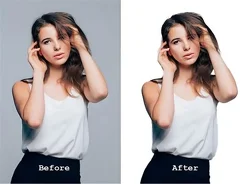
Why Remove the Background?
The “why” is important before we examine the “how”. Any transparent background (typically related to the PNG format) is versatile. Here is how:
· Layering & Stacking:
In case you wish to have a logo on a colored banner, then a transparent background is needed. Otherwise you have got a rectangular border that is ugly.
· E-Commerce Standards
Selling sites, such as eBay and Amazon, prefer clean, white, or transparent backgrounds in product photography. This makes the eye of the viewer only look at the item.
· Professionalism
Appear much more professional when objects are isolated. It can be used to wrap the text and also integrate smoothly into sites.
The Role of AI in Background Removal
Previously, to understand how to have a picture that has no background, a person had to subscribe to Adobe Photoshop and learn how to use the Pen Tool or Magic Wand tool. A boring job, particularly with intricate edges such as hair, fur and tree branches.
Nowadays, this process has been transformed by Artificial Intelligence (AI). Machine learning is a technique of AI-based background removal tools that identify the presence of the foreground subject and the background pixels. They use in-depth edge-detecting algorithms that ensure the two layers are extracted immediately.
The AI perceives the image as a human being would; it recognizes the focal point and by default performs an alpha channel (transparency) on the rest of the picture. This automation is what enables users to understand how to extract images without background information at a single click.
Best Ways to Make Backgrounds Transparent
Transparency can be obtained in three major ways, depending on how skilful you are and how big your budget is.
1. Online AI Erasers (The Fastest Method)
Online automated tools are the most suitable for answering the question of how to make a photo have a transparent background for the majority of users. They do not need any software installation and support both mobile and desktop.
2. Graphic Design Software (The Professional Method)
In case you require print-quality resolution, then software such as Photoshop or GIMp is best.
3. Mobile Apps (The Social Media Method)
In the case of influencers and social media managers, you can take the photo and add stickers or stories without going into the background using apps.
Top Tools to Get Images without Background
Need to know how to create a picture with no background in special software, and then these are the leading industry competitors.
· Remove.bg
This is probably the best-known tool on the market. It is entirely focused on isolating the objects. It is easy to use; you just have to drag and drop on your image. The AI automatically identifies the subject and eliminates the background.
· Adobe Express (Free Online Tool)
The powerful engine provided by Adobe is offered as a free web-based version. It is outstanding when one wants to know how to make a photo with a clear background without purchasing Photoshop.
· Canva
Non-designers depend on Canva. Although the background remover is a feature of the Pro, it is one of the best workflows on the market.
· PhotoRoom
It is an e-commerce mobile-first app that is unbelievable. It not only eliminates the background but it also directly hints at the studio-lighting backgrounds to take the place of the original.
Final Thoughts
A basic digital skill is to learn how to make an image with a transparent background. It improves the quality of your presentations, store listings, and social media content instantly.
Depending on the accuracy of Photoshop or the speed of AI-driven web solutions, being able to obtain images free of background noises opens your creativity. The next time you press the shutter button, keep in mind that you are not limited to the disorganized room in the background; with the proper equipment, you can use it to isolate your subject and put it anywhere.