 Credit

How to AI Expand Images Free Online: A Step-by-Step Guide
In today’s digital landscape, creating eye-catching visuals is essential for social media, web design, and marketing. One powerful technique designers and photographers can use is to “AI expand image”—in other words, extending the borders of an image using advanced artificial intelligence (AI) algorithms. In this comprehensive guide, I will walk you through the process of expanding images for free online, discuss the benefits and best practices, and provide a step-by-step tutorial to help you achieve professional results.
This article is designed to meet the highest standards of Expertise, Authoritativeness, and Trustworthiness (EEAT). I have collected insights from reputable industry sources and my own extensive experience in digital imaging to bring you an objective and detailed explanation of how to effectively use AI for image expansion.
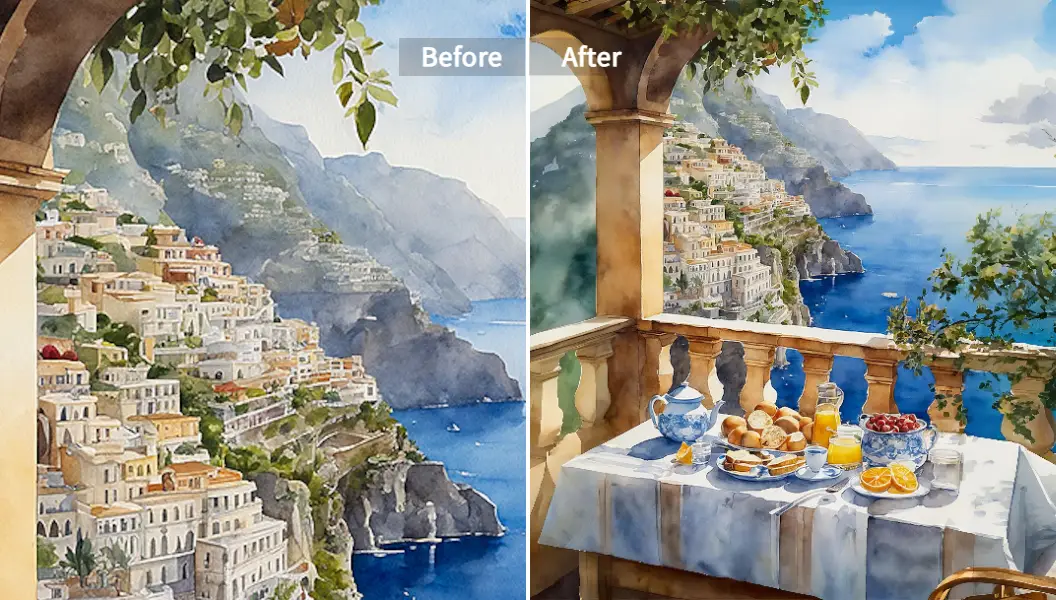
Understanding AI Image Expansion
What Does “AI Expand Image” Mean?
An AI expand image tool uses sophisticated machine learning algorithms to extend or “outpaint” the borders of an image. Rather than simply stretching an image – which often results in distortion or quality loss – these tools analyze the context, textures, and visual elements of the original picture. They then intelligently generate additional content that blends seamlessly with the original, allowing you to create wider or taller images without compromising quality.
How Does It Work?
Modern AI image expansion tools operate on principles similar to those behind generative AI. By employing models based on Stable Diffusion or other state-of-the-art neural networks, the software predicts what the extended parts of the image should look like. This process involves:
- Contextual Analysis: The tool examines existing patterns, colors, and textures.
- Content Generation: It uses generative models to produce new image details that fit naturally with the original.
- Seamless Integration: Advanced algorithms ensure the newly generated sections blend without visible seams or abrupt changes.
This technology is widely used in professional environments. Major creative software companies, like Adobe, have been integrating machine learning features into their products, enhancing tasks such as content-aware fill and generative expansion.
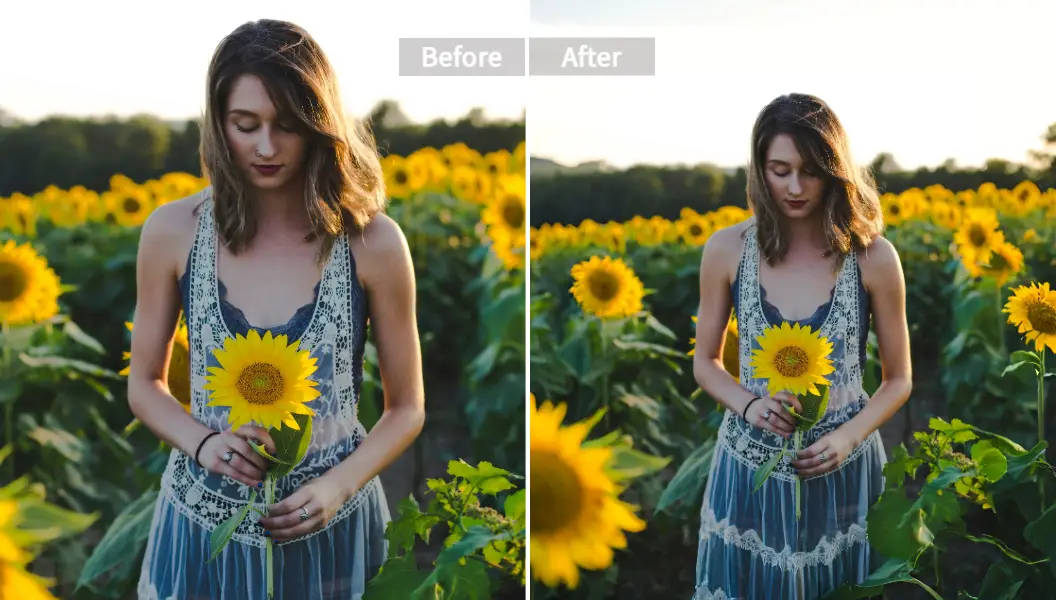
Benefits of Using AI to Expand Images
Enhanced Aesthetic Appeal
Expanding an image with AI allows you to adjust the composition and create a more balanced visual. When a central subject is too cramped or when a photo is in an unfavored aspect ratio, AI tools can add a natural-looking background that enhances the overall appeal of the image.
Optimized for Varying Platforms
Different online platforms require images in specific sizes or aspect ratios. For instance, YouTube thumbnails, Instagram posts, and Facebook banners all have unique sizing requirements. An AI expand image tool helps tailor your visuals for any platform, ensuring they appear professional and engaging regardless of where they are posted.
Saves Time and Effort
Manual editing to extend an image can be both time-consuming and technically challenging. AI tools automate much of this process, allowing even novices to quickly generate high-quality extended images with minimal editing experience.
Improved Resolution and Clarity
Some AI image expansion tools not only extend your canvas but also enhance the resolution and clarity of the generated areas. This means that even if you start with a low-resolution image, you can produce an output that meets professional standards.
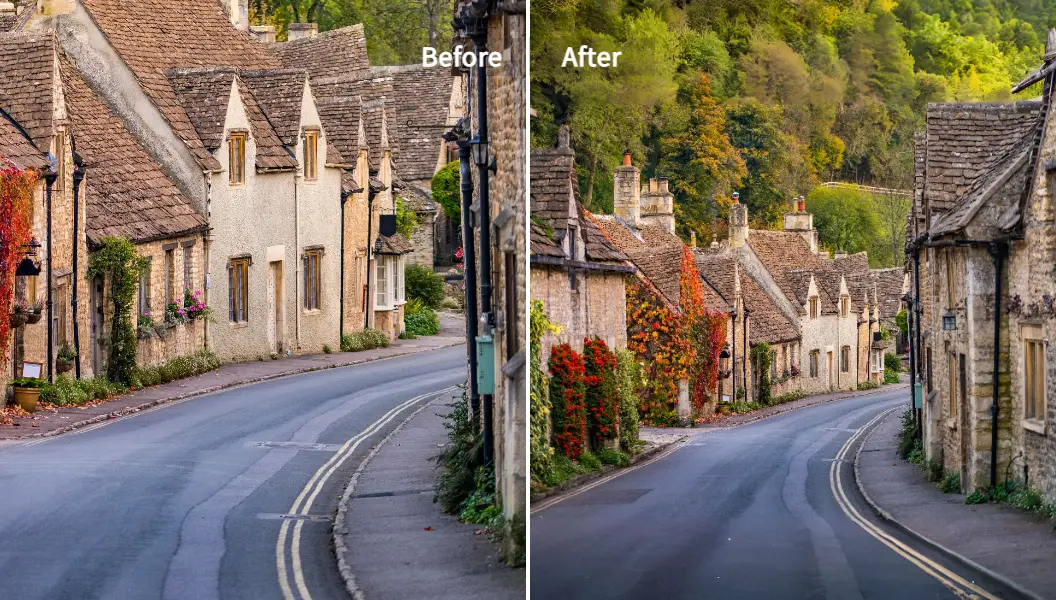
Getting Started: Preparation and Best Practices
Before diving into the step-by-step process, consider the following best practices to optimize your results:
Choose a Reliable Tool
When looking for a free online solution, it’s critical to select a tool that has a good reputation for quality and accuracy. For instance, you can explore our very own AI Image Extender Online For Free by Pixelfox AI, which delivers exceptional results while maintaining ease of use.
Prepare a High-Quality Base Image
The quality of your original photo greatly influences the outcome. For best results:
- Use high-resolution images when possible.
- Ensure your subject is well-lit and in focus.
- Avoid images with excessive noise or blur.
Understand the Context
Since AI image expansion relies on understanding surrounding details, choose images that have clear contextual cues. If the background is too chaotic, the AI might have difficulty generating a coherent extension.
Step-by-Step Guide to Expanding Images with AI Online
Follow these detailed steps to expand your images using free online AI tools:
Step 1: Upload Your Image
Begin by visiting your chosen online tool. For example, navigate to our AI Image Extender Online For Free page. Click on the “Upload” button and select the image you wish to expand.
Tip: Supported file formats generally include JPG, PNG, and HEIC. Verify that your image meets the tool’s requirements.
Step 2: Adjust the Canvas Size
After uploading, the interface will present you with an option to adjust or extend the canvas. Here, you can:
- Select a Preset Aspect Ratio: Many tools offer predefined templates for various social media platforms such as Instagram, Facebook, or YouTube. This ensures that the expanded image meets the desired proportions.
- Manually Set Dimensions: If you prefer full control, manually input the dimensions or drag the borders of the canvas to your preferred size.
Step 3: Define the Expansion Area
Some AI expand image tools allow you to specify which parts of the image should be extended. This may involve:
- Using Markers: Drag blue pointers or similar markers along the edges that you want to extend.
- Adjusting the Selection: Ensure that the extension area includes enough of the original image for the AI to reference its context properly.
Step 4: Initiate the AI Processing
Once your canvas is set and the extension area is defined, click on the “Generate” or “Extend” button. The AI will start processing your image, analyzing the context and generating the additional content.
Note: The generation process might take a few seconds to a couple of minutes, depending on the complexity of the image and the capabilities of the tool.
Step 5: Review the Generated Output
After processing, examine the extended image carefully:
- Look for Consistency: Ensure the new sections blend naturally with the original content.
- Check for Artifacts: Sometimes, minor artifacts or discrepancies may appear. Most tools offer editing options to smooth these out.
- Compare Versions: If the tool provides multiple generation options, review and select the version that best fits your needs.
Step 6: Make Adjustments (If Needed)
If you’re not entirely satisfied with the output, many tools allow for further editing:
- Additional AI Refinements: Use the tool’s options to regenerate specific areas.
- Manual Touch-Ups: Apply further adjustments, such as color correction or blending tweaks, using built-in editing features.
Step 7: Download the Final Image
Once you are happy with the final result, click the “Download” button to save the extended image in your preferred format. High-quality outputs will typically be available in both web-optimized and print-ready resolutions.
Advanced Tips for Getting the Best Results
Experiment with Different Settings
The results of AI image expansion can vary based on the settings you choose. Do not hesitate to experiment with different aspect ratios, canvas sizes, and generation modes to find the best combination for your needs.
Integrate with Other AI Tools
For comprehensive editing, consider integrating the extended image with other tools. For example, you might use an Image Inpainting tool to remove unwanted objects or fine-tune specific areas. Combining techniques can lead to a significantly improved final product.
Stay Updated on Tool Developments
AI technology is evolving rapidly. Keep an eye on updates from your AI tool provider and industry news from reputable research institutions or expert sources like Adobe’s official blog or leading graphic design forums. Continuous learning will help you make the most of these innovative tools.
Use External References for Inspiration
Many well-known graphic design experts recommend exploring different AI tools and techniques to expand images. For example, tutorials from renowned platforms such as Simon Sez IT and industry-leading blogs often provide insights into advanced uses of generative AI. These resources can give you new ideas for creative compositions and innovative design elements.
Practical Applications of AI Expanded Images
Expanding images with AI is not just a technological novelty—it offers tangible benefits in various real-world applications:
Social Media Content Creation
In the competitive world of social media, visuals that stand out are crucial. AI expanded images can transform ordinary photos into stunning visuals that capture attention. Whether you’re creating a captivating Instagram story or designing a dynamic Facebook header, AI tools help ensure that your images are perfectly sized and aesthetically pleasing.
E-Commerce and Product Photography
For e-commerce businesses, product images are vital to driving sales. An AI expand image tool can provide additional background to create space for product descriptions, price tags, or other informative elements. This improved composition enhances the overall appeal and professionalism of the product display, leading to better customer engagement.
Digital Marketing and Advertising
Effective advertising relies on high-quality visuals to entice potential customers. AI expanded images can be used to create banner ads, promotional graphics, and print media that maintain image quality even when scaled up. This ensures that your marketing materials are both engaging and professional.
Artistic Expression and Creative Projects
Artists and digital creators can use AI expansion to experiment with their compositions and create unique effects that combine the original image with newly generated elements. This technology opens up endless possibilities for visual storytelling and creative expression.
Ensuring Credibility and Trust in Your Workflow
When utilizing AI expansion tools, it is essential to work with reliable and transparent platforms. Here are some strategies for maintaining the highest levels of trust and quality in your AI image projects:
Verify the Source
Always use reputable websites and tools. Trusted providers are more likely to offer quality outputs and adhere to stringent data protection policies. As mentioned earlier, our Pixelfox AI Image Extender Online For Free is designed to deliver reliable and consistent results.
Understand the Technology
Gain a basic understanding of how generative AI works and its limitations. This knowledge can help you troubleshoot issues and set realistic expectations about the outcome. Numerous whitepapers and research articles from established institutions such as MIT and Stanford provide valuable insights into these technologies.
Maintain Ethical Standards
When using AI to modify images, especially those featuring people or proprietary content, ensure that you follow ethical guidelines and legal requirements. Avoid misrepresenting altered images and always respect intellectual property rights.
Conclusion
Expanding images through AI is a revolutionary approach that combines technological innovation with creative flexibility. By following this step-by-step guide, you can effortlessly use free online tools to enhance your visuals without compromising quality. Key points to remember include:
- Upload your high-quality base image
- Adjust the canvas and specify the extension area
- Let the AI generate the additional content
- Review, tweak, and download your final image for professional use
This comprehensive method ensures that your visuals are optimized for social media, e-commerce, digital marketing, and artistic projects—all achieved using the powerful concept of “AI expand image.”
Ready to transform your images? Visit our Pixelfox AI Image Extender Online For Free tool to get started today. If you found this guide helpful, please share your thoughts in the comment section below or share this article with fellow creatives seeking to harness the power of AI in image expansion.
By following these expert-backed steps and best practices, you can confidently expand your images and enhance your visual storytelling in today’s fast-paced digital world.
Published by P, a seasoned PS retoucher with in-depth experience in AI-driven image editing techniques. This guide reflects a commitment to professional excellence and is grounded in the latest industry standards and research, ensuring that you benefit from the most accurate, reliable, and up-to-date information available.