 Credit

When was the last time you asked, "How did they shoot that in such a perfect studio?" after seeing a sleek product presentation on YouTube? A roll of green fabric or an expensive set are no longer the solution. With just one click, an AI video background generator can now replace boring walls with animated gradients, customized boardrooms, or cinematic cityscapes—all without the need for green screen. Learn how artificial intelligence (AI) backdrops for videos operate, where artists utilize them, and how to start creating your own visually striking backdrops for free below.
1. Why Creators Are Switching to an AI Video Background Generator
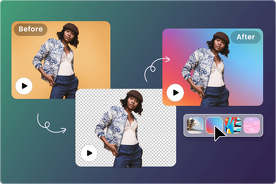
Conventional background removal required hours of post-production work, an actual green screen, and ideal lighting. Vloggers, small-business marketers, and remote educators without funds or space were excluded from that workflow. The artificial intelligence (AI) video background generator is a cloud-based engine that employs machine learning to instantly distinguish between the background (everything else) and the foreground (you).
Top reasons for the switch
• No Hardware Cost: No pop-up screens, ring lights, or green paint
• Quick Results: Create a fresh AI backdrop for a movie in 5–15 seconds.
• Flexibility: Use a dropdown menu to switch between a minimalist workplace and a Tokyo nightscape.
• Privacy: You can record in your kitchen or post from a virtual beach, and no one will know. • Professional polish: depth-of-field blur, color matching, and shadow casting are all handled automatically.
The AI video background generator makes it equal whether you're creating investor pitch videos or TikTok clips.
2. How the Free AI Background for Video Engine Works
Behind the curtain sits a convolutional neural network trained on millions of labeled frames. Here’s the painless workflow:
Step 1: Record or Upload
You can either use your webcam to record live in the browser or drag an existing clip (MP4, MOV, or WebM up to 500 MB).
Step 2: Segmenting the Foreground
Every pixel that belongs to individuals, animals, or anything you designate as "keep" is identified by the model. Pixel-by-pixel preservation of hair wisps and semi-transparent spectacles is achieved.
Step 3: Change the Background
Select from more than 300 pre-made AI backgrounds for video bundles, including branded templates, animated loops, and static pictures. Additionally, you can submit your own JPG or PNG files, and the engine will turn them into a smooth 4K loop.
Step 4: Adjust and Export
Modify the color temperature, edge feathering, and blur strength. Once you're satisfied, click "Export" to download a watermark-free HD or 4K MP4.
3. Creative Ways to Use AI Background for Video Across Industries
Online Education and Training
To keep pupils engaged, teachers employ virtual classrooms or spotless whiteboards in place of disorganized living rooms.
Dropshipping & Online Shopping
After filming product demos on their phones, sellers drop in stylish loft residences or minimalist studios that complement the aesthetics of their brands.
Gaming and Live Broadcasting
Without using OBS chroma-key plugins, streamers move around animated cyberpunk cityscapes or fantasy woodlands.
Interviews & Podcasts
Travel expenses can be reduced by having two visitors from different nations appear side by side in the same virtual lounge.
Because the ai video background generator supports transparent exports, you can layer the video over slide decks or websites for hybrid presentations.
4. Tips for Getting Studio-Quality Results Without a Green Screen
1. Lighting Is Still Important
Soft, even light on your face is the best for even the smartest AI video background. Sit with your back to a window or use a ring light.
2. The King of Contrast
Don't wear clothes that match the hue of your walls. Edge detection is enhanced when a dark shirt is placed against a light wall, or vice versa.
3. A steady camera
The AI may become confused by motion blur introduced by a shaky phone. Make use of a book stack or tripod.
4. Record at 1080p or higher Resolution:
Cleaner cut-outs are produced by the model analyzing more pixels at a higher resolution.
5. Pay Attention to the Sound
The illusion is sold with a clear voiceover. To prevent echo, record using the phone's earphones or a lapel microphone.
6. Preview Prior to Final Render
To identify stray artifacts around hair, use the integrated preview loop. Usually, it can be fixed with a short feather adjustment.
Conclusion: Your Dream Set Is One Click Away
The ai video background generator has made professional video creation more accessible due to advancements in machine learning. A green screen, pricey lighting, and sophisticated editing abilities are no longer required. You may match brand aesthetics, publish visually striking footage that rivals high-end studios, and shift backdrops in real time with the free AI background for video tool mentioned above. Watch your typical room become any world you can imagine by uploading your first clip right now.
FAQs
Q1: Is the ai video background generator really free?
Yes. Standard HD exports are 100 % free, no watermark. Optional 4K upscales cost a small one-time fee.
Q2: Do I need a green screen or special lighting?
No. The AI segments foreground using color and depth cues, so a plain wall and decent lighting are enough.
Q3: What file formats are supported?
Upload MP4, MOV, WebM up to 500 MB. Export in MP4 (HD or 4K).
Q4: Can I use my own image as a background?
Absolutely. Upload any JPG or PNG and the engine will loop it seamlessly.
Q5: Will the AI work with multiple people in the frame?
Yes. It detects each person individually and keeps them in the foreground together.
Q6: How long does processing take?
Most 60-second clips finish in under 30 seconds on cloud GPUs.
Q7: Is my video stored permanently?
No. Files are encrypted and auto-deleted after 24 hours.
Q8: Can I use the output commercially?
Yes. All generated videos are royalty-free for personal or commercial use.