 Credit

We want our photos to appear picture-perfect, be it on social media, a portfolio, or just personal memories. This is made possible with the help of a photo retouch application. With these apps, you can fix all the little scratches, change the lighting, blur the skin, and make your photos look more impressive without any knowledge of expert skills in editing.
Twisting boring or blurry pictures into shiny, sharp, and smooth images can be done in a few taps. Such applications as Pixelfox AI Photo Retoucher simplify this task. It does all the adjustments of removing spots, affixing colors, and makes the portraits, leaving your natural appearance untouched.
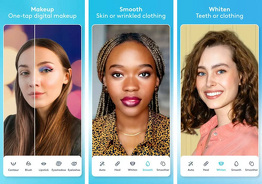
Why You Should Use a Photo Retouch Application?
Every photo, even a well-taken one, can benefit from a little retouching. Maybe the lighting wasn’t perfect, or a blemish appeared at the wrong time. These problems are instantly removed using the photo retouch app. It allows you to digitize and improve photos using easy-to-use editing, such as:
Removing blemishes or acne
Whitening teeth and brightening eyes.
Smoothing on the skin and minimizing wrinkles.
Controlling brightness, contrast, and color.
Erasing unintended elements in the background.
These apps are accessible to all users, amateurs or experts. To fix them with just one click, applications such as Pixelfox AI Face Beauty Tool can be used to make your natural glow brighter and more even tones, and sharpen your features without any over-editing.
Top Photoshop Apps for Powerful Editing
In case you would like to have more customization of your photo editing, the good photo shop apps provide features of a professional level in an easy-to-use edition. Here are a few of the best ones:
Pixelfox AI: An AI-based online photo retouching tool that autotouches skin and increases the portraits, and smooths out the details.
Adobe PhotoShop Express: a lightweight version of the traditional Photoshop that enables you to edit your photos, correct, and touch up in order to obtain a high-quality photograph. It suits its beginners and professionals.
Airbrush: This app is made to achieve perfection on the portrait, so it will be easy to use and include such retouching tools as teeth whitening, skin smoothing, and makeup filters.
Pixlr: This tool is best used when one has to do a fast edit, make a collage, and change the background.
VSCO: Perfect to use in case of color grading and using aesthetic filters to create a fashionable appearance.
Snapseed: Designed by Google, this free application provides a user with a comprehensive amount of control over all the elements of a photo, including brightness and spot repair.
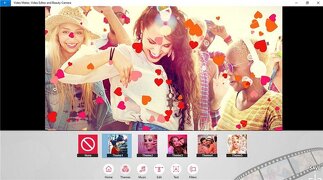
Best Free Retouch Apps You Can Try
You do not need to spend a lot of money on applications to help your pictures shine. The photo retouch free versions such as YouCam Perfect, PhotoDirector, and Remini are the best-quality tools available to common users. Pixelfox AI Retouch App Free goes a step further and enables retouching of the skin in addition to makeup, as well as blemish removal, all online, no downloads needed. These free retouch apps are the right choice in the case of users who prefer to have the clip of professional appearance without paying any money and installing complicated programs.
How to Use an App to Retouch Photos
Using a photo retouch app free is incredibly simple. Start by uploading your picture directly to Pixelfox, no downloads required. Then, select applications such as the AI Face Slimming Tool or the AI Photo Retoucher to fix your flaws. Tune each effect to achieve a natural appearance and then preview and download your edited photo in seconds. Pixelfox is one of the simplest platforms to touch up a photo like a professional through its fast, browser-based editing platform.
Why Choose a Retouch App Free from Pixelfox?
If you’re looking for a free browser-based solution, Pixelfox also offers multiple retouch app free tools. You can use the AI Face Makeup Tool to apply natural-looking makeup, enhance skin tone, and add realistic cosmetic effects, all online and for free.
Pixelfox offers an entire suite of smart AI photo editing tools designed to make retouching effortless. The AI Photo Retoucher and related tools provide results that match the output of top Photoshop apps, yet require zero experience. The retouch application requires no downloads or watermarks, letting you enhance portraits, adjust facial features, and add makeup easily.
Conclusion
You can use a photo retouch application and apply them to polish and make your photos look nice and professional. You can adjust lighting, fix skin wrinkles and spots within a few seconds. Whether you use top Photoshop apps or a photo retouch app free like Pixelfox, achieving great results is simple. Its smart AI tools enhance photos naturally and fast. Try Pixelfox today to turn ordinary pictures into bright, flawless, and eye-catching images.
FAQs
1. Which is the best free photo retouch application?
Pixelfox’s AI Photo Retoucher enhances skin tone, removes blemishes, and delivers professional results instantly, all online without installation.
2. Are AI retouch apps better than Photoshop?
For quick, automatic edits, yes. While top Photoshop apps offer detailed controls, AI tools like Pixelfox are faster, simpler, and beginner-friendly.
3. Can I use a photo retouch app free of cost?
Yes, Pixelfox provides free online tools to enhance portraits, apply makeup, and smooth skin efficiently.