 Credit

You’ve seen it on TikTok, YouTube, and probably in that one cursed meme chat: a photo that suddenly sings, talks, or smirks like it’s alive. That’s AI face animation.
And yeah, when it works, it looks magic. When it fails, it looks… nightmare fuel. 🧟♂️
If you’re here, you probably want at least one of these:
- Make a face photo animation for a short video or meme
- Try a free face animation app before paying for anything
- Use an animated face generator for marketing, UGC ads, or client work
- Get smooth AI face movement instead of jittery, fake-looking lips
This guide walks you through what AI face animation actually does, why it works, the best tools in 2025, and how to get pro-level results fast using Pixelfox AI as your main AI face mover and editor.
We’ll fix the “uncanny valley” problem, compare it with old-school tools like Photoshop, and give you real workflows you can steal today. 🚀
What Is AI Face Animation?
Let’s keep it simple.
AI face animation means: an algorithm takes a still face image (or a simple video) and makes it move. The tool reads:
- Where the eyes, nose, mouth, and jaw are
- How these parts should move when someone talks, sings, or shows an emotion
- How to sync those movements with audio or pre-set motion
So the AI models:
- Track key points on the face
- Map those points to motion from another clip or audio
- Render a new video where your face moves, talks, or sings
This is how:
- A single selfie turns into a singing music clip
- A photo of your pet looks like it raps 🐶
- A static avatar “hosts” your YouTube Shorts or ads
Many tools use tech like:
- Facial landmark detection
- Motion transfer models
- GANs or diffusion models for smoother frames
You don’t need to know the full math. You just need to know what the tool is good at:
- Lip-sync (talking / singing)
- Expression changes (smile / angry / shocked)
- Full head face movement (nod, tilt, react)
The good news: you don’t need cinema-level gear now. You just need one decent face animation app or face animation online tool, like Pixelfox AI, and a clear photo.
Why AI Face Movement Grabs So Much Attention
People are wired to look at faces. That’s not hype.
According to long-running research from places like Nielsen Norman Group and Stanford, faces in content:
- Hold attention longer
- Boost emotional response
- Help people remember your message better
When you add AI face movement on top of that, you get:
- Talking-head content without a camera day
- Personal-looking videos, even if you are shy or off-camera
- UGC-style clips that still feel human
Marketing reports from HubSpot and Statista show that short video keeps growing as the top content format. A big part of that is “talking to camera” style videos.
AI face animation lets you fake that in a way that still feels real enough to scroll-stop. If you get the setup right.
Main Ways People Use AI Face Animation (Beyond Just Memes)
Here’s where the real value comes in. This is how creators and teams use ai face animation in 2025.
1. Short-Form Content, Memes, and Reactions
- Make a face photo animation that lip-syncs to a trending audio
- Turn old character art into reaction clips
- Use an animated face generator for meme pages and fan accounts
With a tool like AI Face Singing from Pixelfox, you upload one face photo, drop in a song, and you get a clean lip-sync, with styles like Active / Normal / Calm. That covers everything from hype rap to sad ballad. 🎧
2. Marketing, Ads, and UGC-style Creatives
Brands use AI face animation to:
- Test video ads fast without booking talent
- Produce “talking head” explainers for products
- Localize content into different languages with synced lips
A smart workflow:
- Use Pixelfox AI Face Beauty to clean up your headshot
- Then animate it with voice or song
- Then mix it into your ad or landing page hero
This gives you UGC-style content without begging influencers.
3. Education, Training, and Internal Videos
Teachers and trainers use face animation online to:
- Turn static mascots into “hosts”
- Add talking avatars to slides
- Make safety or HR content less boring
Learners pay more attention when a “person” explains something, even if that “person” is a well-made AI avatar.
4. Avatars, VTubers, and Stylized Content
You can also animate anime or cartoon-style portraits:
- Turn your photo into anime
- Then animate that anime version
- Use it for streams, profile pics, or channel branding
Pixelfox has an AI Anime Generator that turns photos into manga-style, 3D, or Chinese painting looks. You keep identity and expression, but the style is pure anime. 😎
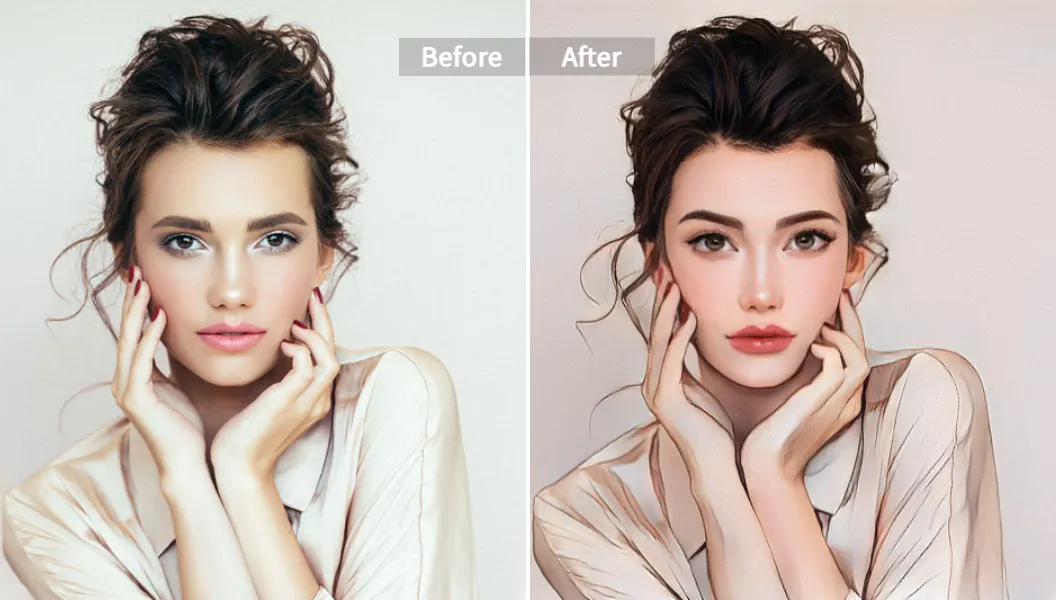
Alt: AI face animation anime-style portrait from photo using AI Anime Generator
Tip
If your brand is camera-shy but wants a face, build a stylized avatar once, then use AI face animation to “host” everything: reels, tutorials, and ads. You get consistency without burnout.
Best AI Face Animation Tools in 2025 (With Honest Pros/Cons)
There are a lot of face animation app options and face animation online tools. Some are great. Some are… proof-of-concept at best.
Here’s a straight rundown, with Pixelfox AI as the main pick.
Pixelfox AI – A Full AI Face Mover Toolkit 🏆
Pixelfox is not just one ai face animation trick. It’s more like a toolbox built around faces and portraits.
Key tools:
-
AI Face Singing
Turn a single photo into a lip-sync video. Upload a face (human, pet, or cartoon), add audio, choose Active / Normal / Calm style, and generate. Great for TikTok, Reels, and fan edits. -
AI Facial Expression Editor
Change expressions on a photo. Turn a neutral face into a big smile, pout, or angry look. Good for thumbnails, memes, or subtle changes if someone blinked. -
AI Face Beauty
Smooth skin, improve lighting, and enhance portraits in one go. Nice when your source photo is okay but not “camera ready”. -
AI Face Reshape
Slim your face, enlarge eyes, tweak nose or mouth. Useful when you want a polished avatar or profile pic before you animate. -
AI Video Face Swap
Swap faces in videos while keeping expressions and lighting natural. Great for fun edits, concept work, or creative storytelling. -
AI Anime Generator
Turn human photos into anime or cartoon styles, then feed those into your face animation workflow.
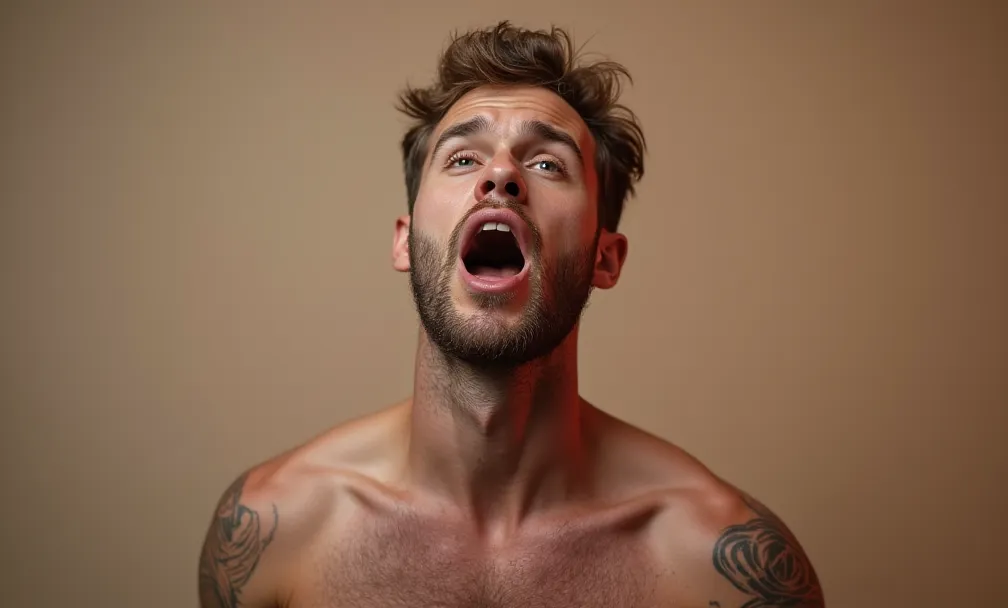
Alt: AI face animation singing portrait example with lip-sync
Why Pixelfox is strong as an animated face generator
- Runs in the browser, no heavy install
- Handles humans, pets, and drawn faces
- Gives you multiple tools around the same face (beauty, reshape, anime, singing, swap)
- Designed for non-tech people, but still useful for pros who want speed
Weak spots
- You still need a decent source photo
- It’s not a full film-grade 3D system (and that’s okay for 99% of use cases)
Other Popular Face Animation Tools (Quick View)
There are other tools you may see in search results. Think D-ID, HeyGen, Wombo, Reface, and a bunch of mobile apps.
In general:
- Some focus on talking avatars for business
- Some are meme-first, with heavy filters
- Many free versions have big watermarks, low resolution, or strict limits
They can be useful, but many lack the all-in-one face toolkit Pixelfox gives you. You often need another app for retouching, another app for style changes, and so on.
Step-by-Step: Face Animation Online With Pixelfox AI
Let’s walk through a real workflow. You want a clean face photo animation that sings a song for TikTok or Reels.
We’ll use Pixelfox AI Face Singing as the base example.
Step 1: Pick the Right Photo
You need:
- A clear frontal face
- Good lighting on the whole face
- No huge sunglasses or heavy motion blur
You can use:
- A selfie
- A high-res portrait
- A pet photo
- A cartoon character
Bad input = bad ai face animation. The model can guess a lot, but not magic everything.
Step 2: Upload to AI Face Singing
Go to AI Face Singing on Pixelfox.
- Drag and drop your image
- Or paste from your clipboard
- Wait for the upload to complete
You see a preview of the face so you can confirm framing.
Step 3: Add Audio
You can:
- Upload a song clip or voiceover (up to about a minute, depending on your plan)
- Use clean, clear audio with no loud background noise
The AI will sync lip movement to this track. If the audio is muddy, your result still animates, but it feels messy.
Step 4: Choose a Singing Style
Pixelfox gives you singing modes like:
- Active – big movements, hype energy, great for pop / rap
- Normal – balanced and natural for most songs
- Calm – subtle, chill motions for ballads and soft tracks
Pick the style that matches the beat and vibe of your audio.
Tip
If you’re unsure, generate a short clip in two styles (Active and Normal) and compare. One will usually “click” with your track right away. Let your eyes judge, not the settings list.
Step 5: Generate and Download
Hit Create.
The system:
- Analyzes the audio
- Maps the timing to lip and face movement
- Produces your video clip
Then you:
- Preview the animation
- Download it
- Share it on TikTok, Instagram, YouTube Shorts, or send it in chat 😏
From nothing to a solid ai face mover clip in a few minutes.
Advanced Tricks: Make Your Animated Face Look Less Fake
Most “this looks weird” problems come from avoidable mistakes. Here’s how to push quality up to pro level.
1. Clean Your Face Before You Animate It
If the original photo is noisy or flat, fix it first.
Use tools like:
- AI Face Beauty to smooth skin and improve light
- AI Face Reshape for subtle tweaks if the camera angle distorted your features
You don’t need to go full plastic. Just make the base image clean. The AI can track landmarks better with a sharp, well-lit face.
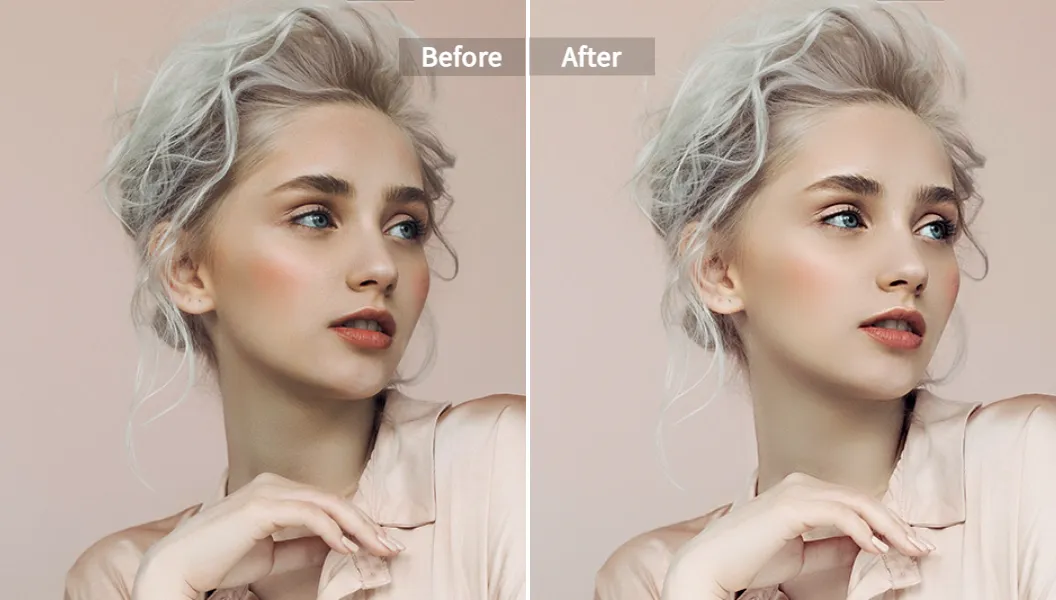
Alt: AI face animation portrait enhanced with AI Face Beauty tool
2. Match Emotion to Audio
This is the part many people skip.
If your audio is angry or very hype, but your photo looks dead inside, the result feels off.
So:
- Use a source photo that already matches the mood
- Or change the expression first with an AI expression editor
Happy song → smiling or warm photo.
Sad track → softer, calmer face.
3. Keep Clips Short and Focused
Short clips hide small flaws. Long monologues expose them.
Use AI face animation for:
- Hooks
- Punchlines
- Chorus parts
- Short explanations
Then cut them into your live footage or B-roll. Don’t expect a single 3-minute AI talking head to feel perfect all the way.
4. Don’t Overuse Movement
More movement does not always mean better.
Too much:
- Head shake
- Eye darting
- Mouth stretch
…makes it feel robotic or cartoonish in the bad way.
You want controlled motion. This is where choosing the right style (Active vs Calm) matters. Calm can often look way more realistic on camera.
Tip
If a clip feels “too much”, lower the intensity. Use a calmer preset, or crop in to show less of the body and focus on the face. Sometimes a tighter frame fixes 80% of the weirdness.
AI Face Animation vs Photoshop and Old-School Methods
People often ask: why not just use Photoshop, After Effects, or a 3D package?
You can. But you pay in time and skill.
Traditional route:
- Shoot a lot of reference footage
- Rig a 3D face, or build complex layers in After Effects
- Keyframe or motion-capture every detail
- Render, tweak, re-render
That’s weeks for one polished animation if you’re not a pro. And you need strong gear and a real budget.
AI face animation route:
- Upload one photo
- Add audio or motion template
- Generate in minutes
You trade fine control for speed and cost. For 90% of social content, ads, and internal videos, that’s a very good trade.
If you do Pixar-level movies, you still need pro 3D. If you are a solo creator, agency, or small brand, AI wins by a mile here.
Pixelfox AI vs Other Online Face Animation Apps
You have a lot of face animation app options in the stores. Many are fun for a weekend, then you hit walls.
Common issues with random free face animation app choices:
- Heavy watermarks on export
- Very low resolution
- Aggressive upsells every 10 seconds
- Weak privacy policies for your photos
Pixelfox leans more to the “creator/marketer” side, not just “meme toy”.
What Pixelfox does better than many generic tools:
- Web-based, so you can use it from laptop or phone browser
- Multiple tools around the same face: singing, anime, face swap, beauty, reshape
- Designed to keep expressions and identity consistent, even across styles
- Clear focus on privacy and secure processing
You can prototype with free face animation flows, then upgrade when you need more length or higher quality. So you don’t get trapped out of the gate.
Real Case Studies: AI Face Mover in Action
These are based on real patterns and setups that creators and brands use today.
Case 1: Creator Boosts TikTok Views With AI Singing Photos
A music creator wanted more content between big releases. No time for full shoots every day.
Workflow:
- Shot one clean portrait in good light
- Used AI Face Beauty to polish skin and lighting
- Dropped it into AI Face Singing with 15–30 second hooks of each new track
- Posted daily “singing portrait” clips that teased the song
Results they shared:
- More consistent posting
- Higher watch time on those short clips
- Better pre-save results, because fans saw the face more often
The key win: they didn’t need to film themselves every day. AI handled the face movement.
Case 2: Small Brand Makes a Talking Avatar for FAQs
A small e‑commerce store sold beauty products. The founder hated being on camera.
So they:
- Took one professional headshot
- Cleaned it with AI Face Beauty
- Turned it into a softer anime-style version with AI Anime Generator
- Used that avatar with AI face animation for short FAQ clips on product pages
Think: “animated founder” explaining how to use the product, but in stylized form.
This made the brand feel more human, without forcing the founder to film weekly videos. Time saved, anxiety down, conversion up.
Common Mistakes With AI Face Animation (And How to Fix Them)
Let’s talk about the stuff nobody likes to admit.
Mistake 1: Low-Quality or Weird-Angle Photos
New users often:
- Use grainy screenshots
- Use side profiles with heavy tilt
- Use badly cropped faces
Result: warped eyes, stiff jaw, glitchy mouth.
Fix:
- Use a frontal or near-frontal photo
- Make sure the whole face is visible
- Use good light on both sides of the face
If you only have one decent photo, at least run it through AI Face Beauty once to sharpen and clean it.
Mistake 2: Audio That Sounds Like It Was Recorded in a Tunnel
AI can move a mouth. It can’t fix terrible sound on its own.
If your audio:
- Has loud background noise
- Has clipping
- Has reverb from a big empty room
…your final clip feels cheap, no matter how good the faces look.
Fix:
- Record audio close to the mic
- Use a quiet room
- Trim the audio to the best part
- Run it through basic noise reduction if needed
Mistake 3: Overusing Free Face Animation in One App
A lot of people stick to one free face animation app and never move up. They keep fighting:
- Low resolution
- Forced watermarks
- Very short clips
It’s fine for tests, but not for real work.
Fix:
- Use free tiers to test ideas
- When a format works, move to a tool like Pixelfox that gives you higher quality and more control
- Think of it as upgrading from “toy” to “tool”
Mistake 4: Ignoring Ethics and Consent
Big one.
If you animate someone’s face without consent, especially in sensitive contexts, you step into legal and ethical trouble fast.
Fix:
- Use your own face, stock images you have rights to, or generated avatars
- If you use a client or friend, get clear permission
- Avoid using faces of public figures in ways that mislead people
Professional teams already have this in policy. Individual creators often forget.
Mistake 5: Expecting AI to Replace All Editing
AI is powerful. It is not your entire post-production pipeline.
If you skip:
- Basic editing
- Music balancing
- Text overlays
- Proper pacing
…you get a “tech demo”, not a good video.
Fix:
- Treat AI face animation as one layer
- Cut it into your normal edit
- Use captions, sound design, and pacing to keep people watching
Best Practices From Pros Using AI Face Animation
Here are some habits that separate “eh, cool” from “wow, that slaps”.
Professional Advice: Build a Reusable Face Setup
Pros don’t re-invent the wheel every time.
They often:
- Pick one or two “hero” photos
- Polish them with AI Face Beauty and AI Face Reshape
- Generate anime or stylized versions for different channels
- Reuse these faces across many clips
The personality stays the same. The content changes. That builds recognition, and it keeps work low.
Professional Advice: Use AI Face Animation for Hooks, Not Whole Shows
Creators who get the most from AI often:
- Use animated faces for the hook (first 3–5 seconds)
- Then switch to footage, B-roll, or screen recording
- Drop AI faces again for key lines or punchlines
This pattern keeps attention high and avoids “AI fatigue”.
Think of the ai face mover as your “pattern breaker”, not your whole show.
FAQ: How, Why, and What About AI Face Animation?
How does AI face animation actually work?
The tool maps key points on your face (eyes, nose, mouth, jaw), then lines up those points with motion from audio or a motion clip. It predicts where each part should move for each frame, then renders a video. You get smooth ai face movement without hand-animating anything.
Why do some AI face animations look creepy?
That “uncanny” look usually comes from:
- Bad source photos
- Wrong emotion vs audio
- Overdone movement
- Low-quality models in some apps
Better input photos, better audio, and better tools like Pixelfox make a huge difference.
Can I use a free face animation app for commercial work?
Sometimes yes, sometimes no. It depends on the license and terms. Many free apps allow only personal use or add watermarks you can’t remove. Tools like Pixelfox give you free face animation options to test, and paid plans that clearly allow commercial use. Always check the terms before running client projects.
How is a face mover different from full 3D animation?
A face mover or ai face mover works on top of real or generated images. It doesn’t build a full 3D mesh with bones like a film studio would. You trade deep control for speed and ease. For social content and marketing, that trade is usually worth it.
Can I animate cartoons or anime faces too?
Yes. Many tools, including Pixelfox, work on drawn faces, as long as they have clear eyes, nose, and mouth. A fun workflow is: use AI Anime Generator to create your avatar, then animate that avatar with singing or talking clips.
Ready to Make Your First AI Face Animation?
AI is not here to replace you. It’s here to replace your tenth retake and your “sorry, I look tired today” excuses. 😅
With the right setup, ai face animation lets you:
- Turn one good photo into dozens of talking or singing clips
- Test ad angles without booking talent
- Build a consistent avatar or anime persona across platforms
- Boost watch time and engagement without spending your whole life in front of a camera
If you want a practical starting point, use Pixelfox AI as your main animated face generator:
- Turn photos into singing clips with AI Face Singing
- Clean and reshape portraits with AI Face Beauty and AI Face Reshape
- Create anime-style avatars with AI Anime Generator
- Swap faces in video for creative edits with AI Video Face Swap
Pick one photo. Pick one song. Make one clip.
Then watch how fast you start thinking,
“Okay… what else can I make talk?” 😼
Note: This guide is based on tools and trends available up to late 2024 and early 2025. Features and pricing can change, so always check the latest details on each tool’s own site before you plan big campaigns.