 Credit

You type “how to make face narrower” at 2 a.m., zoom in on your selfie, and think, “Why does my face look rounder than my life choices?” 😅
You are not alone. And no, your camera is not always your friend.
In this guide, we will break down how to make your face look thinner, both in real life and in photos. We’ll talk bones, fat, water, makeup, hair, and also AI. We will also show how Pixelfox AI can give you a slim defined face in your photos in a few clicks, even if you have zero editing skills.
Yes, we’ll keep it honest. No fake “3-day magic jawline” nonsense.
1. Why Your Face Looks Wide (And Why It’s Not Just You)
Before you try to “fix” anything, it helps to know what you are working with.
Your face shape comes from a few main things:
- Bone structure
- Fat distribution
- Muscle size
- Water retention
- Camera and lighting tricks
So when you wonder how to make your face appear thinner, you are really asking, “Which of these can I change, and how?”
1.1 Bone structure: the part you can’t really change
Your skull shape sets the base.
Some people have a wider jaw. Some have high cheekbones. Some have a narrow face by default.
You cannot change bone without surgery. And surgery is a big deal, with real risk and real money. So for most people, we focus on optical tricks and small real changes instead.
Good news: most “small face” celebrities do not only rely on bone.
They use:
- Makeup
- Hair shape
- Good lighting
- Photo editing
You get to use the same tricks.
1.2 Fat: why you can be skinny but still “face chubby”
Dermatologists and sports doctors often repeat this: you cannot pick where you lose fat.
Your body decides. The face is part of that.
Some people lose body fat fast from the face. Others lose it from everywhere else first. That’s genetics. Annoying, but real.
Things that can make your face look fuller:
- High body fat in general
- Very high sugar or alcohol
- Hormonal changes
- Some meds
So how can you make your face look thinner without starving yourself?
You can:
- Drop overall body fat a bit
- Reduce bloat
- Use smart styling and tools
We will get to that in a second.
1.3 Muscles: jaw clenching and chewing
If you grind your teeth, chew gum all day, or clench your jaw, the jaw muscle can get bigger.
Think of it like any other muscle. You use it hard and often. It grows.
This can make the lower face look wider.
Some people fix this with Botox in the masseter muscle. That is a medical treatment. It can work, but it needs a doctor, a budget, and a real talk about risk.
If you just want your face to look slimmer in photos, you do not have to start with injections. You have easier options.
1.4 Water retention: the instant “puffy face” trigger
Salt, alcohol, lack of sleep, and hormones can make your face puff up.
That is not “fat”. That is fluid.
Many people wake up, look in the mirror, and think they gained 5 kg in the face overnight.
They did not. They are just bloated.
Simple stuff that helps:
- Less salty food at night
- More water through the day
- Less alcohol
- Better sleep
Some studies on fluid balance show that even one salty dinner can change face puffiness next morning. You see it on your own face faster than on your waist.
1.5 Camera, lens, and angles: the sneaky villains
Short version: your face is not as wide as your front camera says it is.
Wide lenses (like phone cameras up close) stretch the middle of the image.
So your nose and cheeks can look bigger. When you hold the phone too close, it gets worse.
So part of how to make your face look slimmer is not even about your face.
It is about distance and angle. We will cover this in a later section with simple, “do it right now” tricks.
2. How to Make Face Narrower in Real Life (No Surgery)
Here comes the part you wanted: real methods.
We will start with fast optical tricks. Then we go into slower but deeper changes.
2.1 Makeup tricks that make your face look thinner
You do not need a full influencer kit to fake a small face.
You just need placement and control.
Contour and highlight
Contour is not there to draw big brown lines. It is there to create shadow.
Basic steps:
- Use a matte contour product that is just 1–2 shades darker than your skin.
- Start at the top of your ear.
- Sweep under the cheekbone, stopping about halfway to the mouth.
- Blend up, not down. This lifts the face.
- Put a bit along the jawline if you want more edge. Blend into the neck.
Highlight:
- Tiny bit on top of cheekbones
- Tiny bit down the nose bridge
- Tiny bit on the middle of the forehead and chin
This light-dark mix makes your face appear thinner, even though nothing physical changed.
Tip
If you are new to contour, film yourself in natural light and turn your head slowly. You will see right away where the shadow looks good and where it looks like “I tried a TikTok hack at 3 a.m.”. Adjust from there.
Blush placement for a lifted look
Low blush can drag the face down.
For a slim defined face, try this:
- Place blush higher on the cheek, closer to the temples
- Sweep it up and out, not to the middle of the face
This gives a lifted look and pulls the eye upward.
Eye and brow tricks
You can make your face look slimmer by focusing attention on your eyes.
- Soft winged liner that extends slightly up and out
- Brows with a little lift at the tail
- Slight extra volume on outer lashes
When attention goes to the upper third of the face, the lower part looks lighter and less heavy.
For men or minimal-makeup people
You do not have to use full makeup.
You can:
- Groom brows so they have a clean shape
- Use a tinted moisturizer to even skin tone
- Use a matte, light bronzer around the perimeter of the face for subtle shadow
This keeps things natural but still shapes the face.
2.2 Hair, brows, and accessories for a slim defined face
Sometimes your haircut is the main problem, not your cheeks.
Haircuts that help make a small face
Good moves:
- Long layers that frame the face
- Soft waves that start below the cheekbone
- Side parts if you have a very round face
- Volume at the crown, not at the sides
Bad moves if you want a narrower look:
- Very blunt bobs that stop at the widest part of the cheek
- Too much volume at ear level
- Flat top + wide sides
Ponytail and bun hacks
A high ponytail or high bun with a bit of volume at the crown pulls the eye up.
Leave a few face-framing strands if your face is very round. This softens the edges.
Glasses and earrings
You can use accessories like cheats.
- Choose glasses that are slightly wider than your face, with soft angles
- Go for longer earrings over very wide hoops if your face is short and wide
These small changes help your face appear thinner without touching your actual face.
2.3 Posture and camera angles: free face slimming in seconds
You can change how your face reads in photos today, before you change diet or makeup.
- Hold the camera a bit higher than eye level
- Tilt your chin slightly down and forward
- Turn your face a little to the side instead of dead center
- Step back so the lens distortion is less extreme
Try this: take one selfie with the phone right under your chin. Then take one from slightly above, with your head tilted a bit.
You will see at once how much “face width” is fake.
Tip
Use your phone’s back camera for important photos. It usually has a better lens and less distortion than the front camera, so your face looks closer to real life.
3. Slow But Real Changes: Habits That Shape Your Face Over Time
If you want more than optical tricks, you need some habit changes.
These do not work overnight, but they last longer.
3.1 Food, salt, and water
When someone asks how to make your face look slimmer, the boring answer is often “fix your diet a bit”.
Not fun, but true.
Simple steps that matter:
- Cut down on very salty snacks, instant noodles, and fast food
- Drink enough water through the day, not just at night
- Eat more fruits and vegetables that have water, like cucumber, berries, and leafy greens
- Watch alcohol intake, especially before events where you care about photos
Studies on sodium and fluid show a clear link between high salt intake and facial puffiness. You do not need a lab to see it. One night of heavy salty food and wine is enough.
3.2 Exercise, sleep, and stress
You cannot target face fat only.
But when you lower overall body fat, the face will usually lean out too.
Realistic steps:
- Aim for regular cardio (fast walking, running, cycling, dance workouts)
- Add some strength training to keep muscles strong
- Sleep 7–9 hours if you can
- Try simple stress tools: walks, breathing, stretching
High stress raises cortisol. High cortisol over time can affect fat storage and water retention. So “rest” is not a lazy word here. It is part of face care.
3.3 Facial massage and “face yoga”
Face yoga and gua sha blew up on TikTok.
Some people swear by them. Some roll their eyes.
Here is the balanced view:
- Light facial massage can help with lymph drainage
- That can reduce short-term puffiness
- Better blood flow may give a slight lift in the short term
- You will not “burn face fat” by rubbing your cheeks
If you try:
- Use a face oil or cream so you do not drag the skin.
- Move from the center of the face outward and upward.
- Use light to medium pressure.
- Do it for 5–10 minutes, not one hour of face beating.
Some small studies in cosmetic dermatology suggest massage can improve skin tone and puffiness. But you should see it as a support step, not a magic fix.
4. How to Make Your Face Look Thinner in Photos With AI
Let’s be honest.
Sometimes you do not have time to wait for diet changes. You just need your profile picture, dating app photos, or brand content to look good right now.
This is where AI face editing comes in. And this is where Pixelfox AI is built to make life easy.
Pixelfox offers a set of tools that do the boring technical work for you:
You do not need Photoshop. You do not need to learn layers. You click, adjust, and download.
4.1 Slim your face in seconds with Pixelfox AI
The Pixelfox AI Face Slimming Tool is made for people who google “how to make face narrower in photos” and are tired of weird over-edited apps.
Here is how it works in practice:
- Go to the AI Face Slimming Tool page.
- Upload a photo (PNG, JPG, JPEG, or BMP).
- The AI detects faces and key points like jawline, cheeks, and chin.
- It applies a natural slimming effect.
- You adjust intensity if you want.
- You download the result as JPG or PNG and use it anywhere.
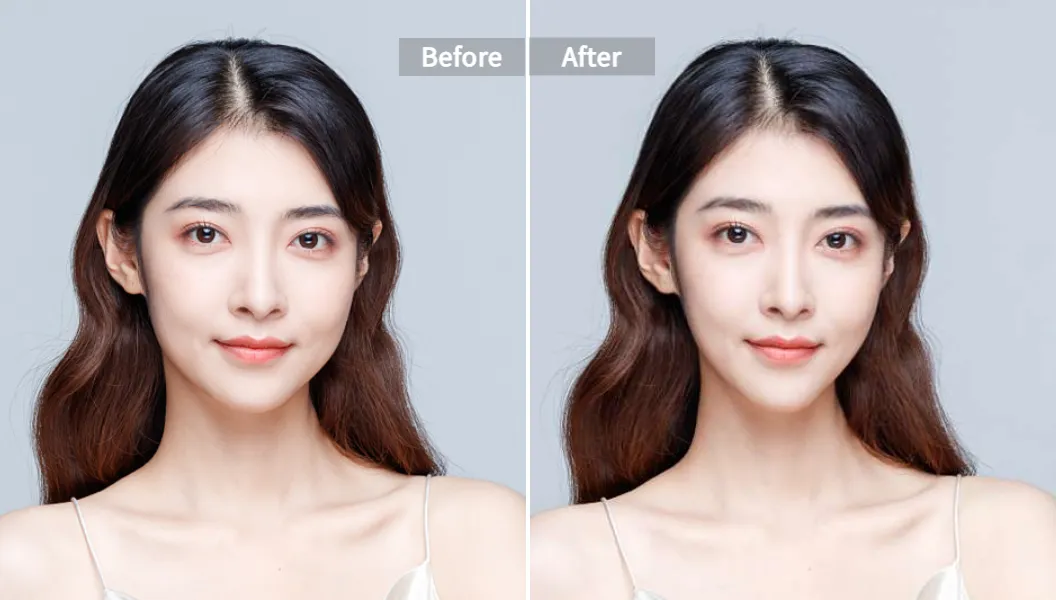
Because the tool uses deep learning, it does not just “shrink” the face randomly.
It studies the structure and keeps your unique features while giving more contour.
Nice extras:
- Works on up to 3 faces in one image, so group photos do not look weird
- Handles faces from different angles, not only straight-on shots
- Focuses on natural proportions, so you avoid that “alien V-line” look
This is great when you want a slim defined face in your pics without lying about who you are.
4.2 Go beyond slimming: reshape, beautify, and add makeup
Sometimes you want more than a slimmer face.
You may want slightly bigger eyes, a softer jaw, or smoother skin.
AI Face Reshape Tool
The AI Face Reshape Tool lets you:
- Slim the face
- Adjust jawline
- Enlarge eyes
- Shape the nose
- Refine lips
You upload a photo, pick what you want to adjust, then move sliders.
The AI applies clean edits that look like a better version of you, not a different person.
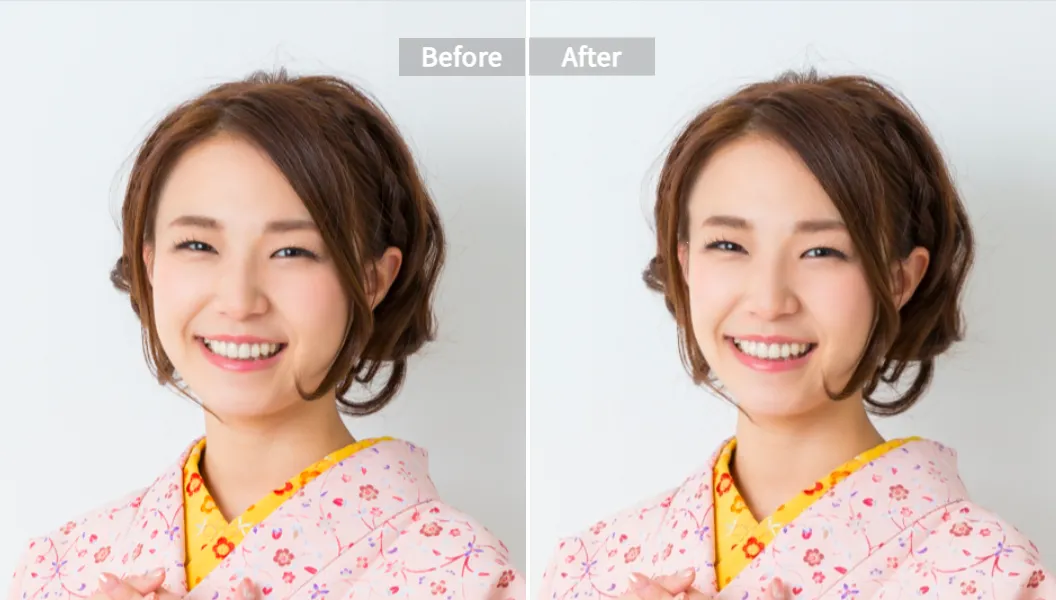
For creators, this is gold.
You can batch-fix headshots, brand photos, or lookbook images without spending hours in pro software.
AI Face Beauty Tool
The AI Face Beauty Tool focuses on:
- Smooth skin
- Even tone
- Soft glow
When your skin looks even and bright, your face often appears thinner because shadows and highlights sit in better balance. You look fresher, not “filtered to death”.
AI Makeup Filter
The AI Makeup Filter gives you:
- Natural everyday looks
- Glam party looks
- Different lip and eye combos
- Virtual tests before you buy real products
This is great if you want to test which contour or blush style makes your face look the narrowest before you spend money on actual makeup.
Tip
Use Pixelfox to test different contour and blush placements. When you find a combo that makes your face look the way you love, copy that placement with real products. Free practice, no wasted makeup.
5. Pixelfox AI vs Photoshop and Other Tools
You might be thinking, “Can’t I just use Photoshop or some random app I already have?”
You can. The question is: should you, and how much time you want to lose.
5.1 Photoshop and classic software
Photoshop is powerful.
It is also heavy, complex, and time-hungry.
To make your face look slimmer in Photoshop, you often need to:
- Open the Liquify tool
- Learn how to move jaw, cheeks, and chin without warping the background
- Fix weird lines and stretched pixels
- Repeat for each photo
That is fine if you are a pro retoucher.
For everyone else, it is overkill.
Pixelfox gives you:
- Web-based access, no install
- Automatic face detection
- Smart presets built for face slimming and reshaping
- Clear sliders instead of complex brushes
- Batch processing for folders of photos
So the same task goes from 10–20 minutes per image to maybe 10–20 seconds.
5.2 Pixelfox vs random free apps
There are many face filter apps. Most of them:
- Over-slim the jaw until it looks fake
- Do not respect your natural features
- Add heavy skin blur and “plastic” skin
- Have confusing privacy policies
Pixelfox is built more like a pro tool with a simple interface:
- Edits stay natural and in proportion
- You can control intensity; nothing is stuck at “extreme”
- Images are processed online and deleted within a short time window, so your privacy is protected
- Tools are broken down by task: slimming, reshaping, beauty, makeup, rather than one big mess of filters
For brands, photographers, and anyone who cares about trust, this matters a lot.
6. Advanced Ways to Use Pixelfox AI (Pro-Level Play)
If you already know the basics and you want to squeeze more value out of your images, here are some advanced ideas.
6.1 Build a consistent “slim but real” brand look
If you run a store, a personal brand, or a content channel, you want your photos to feel consistent.
You can:
- Use AI Face Slimming at the same low-medium level across all product shots with models
- Use Face Reshape to keep small adjustments the same across a whole series (for example, slightly softer jaw and refined nose)
- Use Face Beauty to keep skin tone even so all photos look like the same “universe”
This gives your brand a clean, slim defined face style without crossing into uncanny valley.
6.2 Test looks before real-world changes
Thinking about a stronger contour style, a new haircut, or even injectables?
You can:
- Upload a clear photo
- Use AI Face Reshape to try slightly sharper or softer jawlines
- Combine with AI Makeup Filter to see how heavy contour or higher blush changes the feel
- Use AI Face Beauty to simulate how you might look with smoother skin
This gives you a “preview” without touching your real face.
It helps you make better decisions and talk more clearly with your makeup artist or doctor.
7. Real-World Case Studies: How People Actually Use This
Let’s bring this down to real stories. Names changed, faces not shown, sanity kept.
Case 1: The “slim body, round face” creator
Mia runs a fashion Instagram.
She is fit, but she always felt her face looked round on camera, so clothes did not “read” as sharp as she wanted.
She tried:
- Heavy contour (looked fake in daylight)
- Strict diets (made her tired and did not change the face much)
- Random filter apps (made her look like a totally different person)
Then she switched to:
- Slight changes to camera angle and lighting
- Light contour and blush placed higher
- Pixelfox AI Face Slimming at a low level on all key photos
Now her photos have a consistent, slimmer face look.
Her audience still recognizes her, and her clothes stand out more. Her DM feedback changed from “What filter is this?” to “You look great, where is that blazer from?” which is the real goal.
Case 2: The busy wedding photographer
Alex shoots weddings.
He does not have time to do heavy retouch on every couple portrait, but clients keep asking, “Can you make my face a bit thinner here?”
He uses:
- Light posing tricks on the day (chin forward, turn 3/4)
- Good lighting to reduce shadows under the chin
- Pixelfox AI Face Slimming and Face Reshape in batch mode on the final selection
He keeps changes subtle. Just a small jawline trim here, a softer cheek there.
The couples see the final album and feel confident. Alex saves hours compared to doing everything in Photoshop.
8. Common Mistakes When You Try to Make Your Face Narrower
This part is important. Many people do things that backfire.
8.1 Over-slimming so your face looks fake
If you push any tool to the max, even good AI, you can end up with:
- Distorted ears and hairline
- Neck that no longer matches the face
- A head that does not match your body
This is how trying to follow “how to make a small face” tutorials can give you cartoon results.
Fix:
Stay on the lower half of the slider.
Edit, take a break, then look again with fresh eyes.
8.2 Makeup that makes the face look wider
Some contour hacks on social media are… not kind.
For example:
- Contour placed too low on the cheek, which drags the face down
- Blush in the center of the cheek only, which makes the face look rounder
- Heavy highlight on the side of the face, which adds width
Fix:
Aim for higher placement. Move focus up and out.
If you wonder how to make your face look slimmer with makeup, think “lift”, not “circle”.
8.3 Chasing tricks but ignoring sleep, salt, and stress
You can edit photos all day.
But if every morning you wake up puffy from too much salt and no sleep, you will stay frustrated.
Fix:
Do one small change at a time:
- One less super-salty meal per week
- One extra hour of sleep twice a week
- One simple walk after dinner
Over time, this does more than any single hack.
8.4 Using random apps with bad privacy
Many free apps ask for full access to your photos or store your images for long periods.
If you care about trust, this is a problem.
Fix:
Use tools like Pixelfox that explain how they handle your data and delete images after processing.
Treat your face like personal data, because it is.
9. Best Practices: Professional Advice for a Natural Slimmer Look
If I had to condense the pro advice into a short list for how to make your face look thinner and still look like you, here is what it would be:
- Use angles and camera distance to fight distortion
- Use light, lifted makeup placement instead of heavy stripes
- Adjust hair shape so volume goes up, not out
- Clean up salt, sleep, and stress where you can
- Use AI tools like Pixelfox for small, natural edits, not identity changes
- Look at your edits on a big screen before you post
And remember: the goal is not “change everything”. The goal is balance.
10. FAQ: How, Why, and What You Should Know
How can you make your face look thinner without losing weight?
You can:
- Change camera angles and distance
- Use smart contour and blush placement
- Choose haircuts and styles that remove width at the sides
- Use light facial massage to reduce short-term puffiness
- Use Pixelfox AI to slim your face in photos while your real-life changes are still in progress
You do not need to drop a lot of body weight to change how your face reads in photos.
Why does my face look rounder in photos than in the mirror?
Phone cameras, especially up close, distort the image.
The middle of the frame can look bigger. So your nose, cheeks, and jaw can look wider.
Stand a bit farther back, raise the camera slightly, and tilt your chin a bit forward.
You can also fix width fast with the AI Face Slimming Tool from Pixelfox when you edit.
Can facial exercises really make my face narrower?
Facial exercises can improve muscle tone and may help with posture in the neck and jaw.
They do not melt fat in one spot. Spot fat loss is a myth.
You can try them for tone and awareness, but treat them as a small part of your plan, not the main tool.
How to make your face appear thinner in a single selfie?
Quick checklist:
- Raise the camera above eye line
- Turn your face slightly to the side
- Push your chin a bit forward
- Use good light from the front or slightly above
- If needed, run the photo through Pixelfox AI Face Slimming for a subtle jaw trim
This combo takes less than a minute once you get used to it.
What is the difference between face slimming and face reshaping?
Face slimming usually means making the face look narrower or less full, mostly around cheeks and jaw.
Face reshaping includes more changes, like eye size, nose shape, lip shape, and jawline.
Pixelfox splits these into tools:
- AI Face Slimming Tool for direct slimming
- AI Face Reshape Tool for broader facial edits
- AI Face Beauty Tool for skin and glow
- AI Makeup Filter for full styling
You can use one or stack them depending on how far you want to go.
11. Ready for a Slimmer Look? Do This Next
If you read this far, you already know how to make face narrower in theory.
You know you can use styling, habits, and smart tools instead of random, risky tricks.
So here is a simple next step:
- Pick one good selfie or portrait you like.
- Upload it to Pixelfox AI Face Slimming.
- Apply a subtle slimming effect and save.
- If you want more, test Face Reshape and Face Beauty on the same image.
See how small, smart changes can give you the slim defined face you wanted, without surgery and without spending hours in complex software.
When someone else types “how to make face narrower” next week, you will already have your answer… and your new profile picture. ✨